

I played Tiny Room Story: Town Mystery, which was created by Kiary Games, an indie studio in Limassol, Cyprus. Its target audience is players ages 4 and older who can navigate a simple interface with text and also enjoys solving puzzles. The platforms supported by the game are iOS and Android.
Narrative is woven into the mystery of Tiny Room Story: Town Mystery through implicit hints and explicit dialogue, alongside artistic shifts in tone. The architecture of the setting controls the story by guiding how the user moves through the space and learns about their goals in the game.


Through implicit hints and explicit dialogue, Tiny Room Story guides the player through a linear, evocative narrative of the main character investigating their abandoned hometown. A mechanic in the game’s design is the exposition in the beginning of the game and pieces of dialogue from the main character scattered throughout. For example, we learn about the character’s father through him telling us “A gun?! My father hates weapons, why does he keep it?”. This creates a dynamic of the player uncovering an existing storyline and gives the player guidance. The aesthetic/type of fun this creates is discovery, since the player is uncovering a new narrative. The designer chose against leaving the player to roam the space freely like in walking simulators but instead chose to use text dialogue to stick more rigidly to the linear story. Furthermore, the explicit dialogue can help younger/novice players learn what is and isn’t useful information in solving the mystery, avoiding undesirable dynamics such as confusion and frustration (aimlessly clicking around, which I hit at one point).


By giving the player the autonomy to explore the space but only one set of correct “solutions” that advances the story, the designer is able to exert more control over the narrative. Thus, it is crucial for the designer to embed implicit hints throughout the game. An example mechanic is providing limited resources for the user and making the objectives clear through discovery. This creates the dynamic of trial and error for the player, and the lack of feedback from the system is indication that the player is not following the procedure the game designed. This can be seen in unlocking the padlock, where I tried various numbers and was unsure if I needed to tap to unlock it after entering a combination, but I found it immediately unlocked when the correct combination was entered. This adds to the aesthetic of challenge as a type of fun, because it informs the user the obstacle they want to overcome and creates a sense of accomplishment when they do.

The architecture serves the purpose of providing objectives in this game. As The Role of Architecture in Video Games reading states, the architecture “tells you what might happen and what you should do”. I saw this most clearly in the locked doors or the scratch marks on the floor of a door that was magically revealed. It gave me a clue to what I was searching for. I think this could be architecture as an obstacle, one of the 4 primary functions of architecture. As architectural spaces are withheld then revealed to the player, it taps into the challenge type of fun as well, since the revealed space is the reward for overcoming an obstacle.

A critique I have of the architecture is that the isometric view hides certain walls, and as someone who did not pay too much attention to the tutorial, I completely missed parts of the space. I ended up unblocking myself through a hint, but I think an option to replay the tutorial would have helped the player.
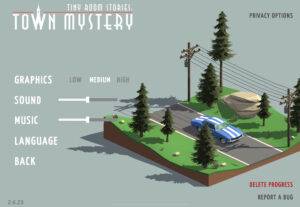
While I did not see any explicit accessibility features in the settings, I find other design decisions, such as written text being the main mode of communication between the game and the player, to be pretty accessible. I say this because speech to text may fall into greater pitfalls, such as the captions obscuring the view of parts of the game. I think the silence or optional music in the game allows players with vision impairments to use text to speech features through this device’s settings (e.g. iOS or Android settings). However, I feel this relies on the device of the player, so I don’t think the designer is completely free of the responsibility of embedding accessibility. Beyond visual accessibility, I think I can best speak to cognitive disability accommodations/accessibility features. According to Accessibility Checker, “Games with complicated menus, overwhelming interfaces, or poorly organized information can be difficult for players with cognitive disabilities, including those with learning disabilities or attention disorders.” Therefore, I think the very simple interface with a few objects displayed to the user at a time is a nice accessibility feature for cognitive disabilities.