


It’s difficult to get myself to sit down and write this thing. Not because I don’t want to — on the contrary, I’ve done nothing but talk and think about this game for the past six months. No, it’s largely because I can’t believe my time in the independent study is ending. Two quarters, countless group meetings and playtests… and yet! I’m still not finished with this damn game! It still feels like I’ve only scratched the surface of what I can do here, what I can do with this project! Alas, all good things seem to come to an end. It doesn’t have to be the end — I’ll definitely keep working on this as well as other projects (keep an eye out for Conclave this winter), but it is the end of my time here. It was beautiful while it lasted. With that out of the way, let’s talk planes!
REMOVE BEFORE TAKEOFF!
A Configuration Aerodynamics Video Game
Have you ever heard of… airplanes? Of course you have! Have you ever wondered… how they fly? Of course you have! Have you ever wondered… I wish there was a video game where I could learn the fundamentals of configuration aerodynamics to gain a more intuitive understanding of how changes in geometry impact the performance metrics of an airplane? OF COURSE YOU HAVE!!!
Welcome to Remove Before Takeoff, a brand-new engineering video game focused on teaching players the fundamentals of aircraft design while having a little fun with it! Ever heard of Kerbal Space Program? Have a copy of the game? Well throw it in the trash, this game’s got all that and more (for planes, rockets not included)! Take on missions to learn about everything from airfoil placement to propeller sizing to optimization for supersonic aircraft.
Introduction
So, why did I even bother making this game? Who is this for, why does this exist? It’s actually fairly straightforward. As many of you that have met me through 399, 377G, and 247G know, I am not a CS person but am actually an AA coterm student. I’ve loved planes for quite a long time, and when I learned I could work on planes as a living I jumped at the opportunity. However, my experience learning the fundamentals of aircraft design here at Stanford hasn’t been all sunshine and rainbows. Something I’ve noticed throughout my time here, both at the undergraduate and graduate level, is that there is an expectation that students gain intuitive understandings of concepts such as aircraft design, stability and control, dynamics, etc. from doing problem sets and reading textbooks. Although this method of learning works for some people, this has never been the way my brain works. My favorite class, the class I learned the most from during my six (6) years (I’ve spent so much time here) during my AA degree at Stanford was the Aero Capstone, where a team of 8 students (including me) worked on building a plane to complete a specific mission for two quarters, back to back. I was able to get my hands on the airplane, mess with its electronics as Avionics Lead, and give advice on how to resize the wings, rebalance its center of gravity, and improve its buoyancy (the plane had to take off from water). Despite all the sleepless nights leading up to commencement, I was still incredibly proud of that project and certainly wouldn’t have landed the job I’ll be starting this summer without it.
Why bring this up? Well, as I’ve learned not too recently, the subsequent cohorts of the Aero Capstone have not had this experience. The one course in which they were able to get their hands on an airplane and really make the project theirs has been stripped down little by little to the point where the course has become a drone-flying course. They simply purchase a pre-made drone, maybe make an addition or two, and call it a day. No extra suite of sensors. No airfoil sizing. No buoyancy modifications. The question becomes — how will this new generation of engineers be able to answer any sort of engineering question on the fly, or have a gut feeling about any engineering question they come across?
That’s where Remove Before Takeoff comes in. It exists as an answer to this question, an answer I wish I had access to when I was first learning to fall in love with aircraft design. The inaccessibility of resources for learning about and experimenting with aircraft design is the gap this game hopes to fill. The target audience for this game is engineering students with a basic understanding of the fundamentals of atmospheric flight, but does not require advanced knowledge and instead aims to teach advanced topics in a more intuitive, hands-on way. This is not to say resources to mitigate what I’m talking about here don’t exist — on the contrary, when starting out at Stanford I found NASA’s Beginner’s Guide to Aeronautics, which contains loads of interactive little modules where students can read about different topics in aircraft design and learn how things change with aircraft geometry. The main issue with resources such as this, however, is that they both look and feel like they were designed in the early 2000’s because they literally were (Fig. 1).
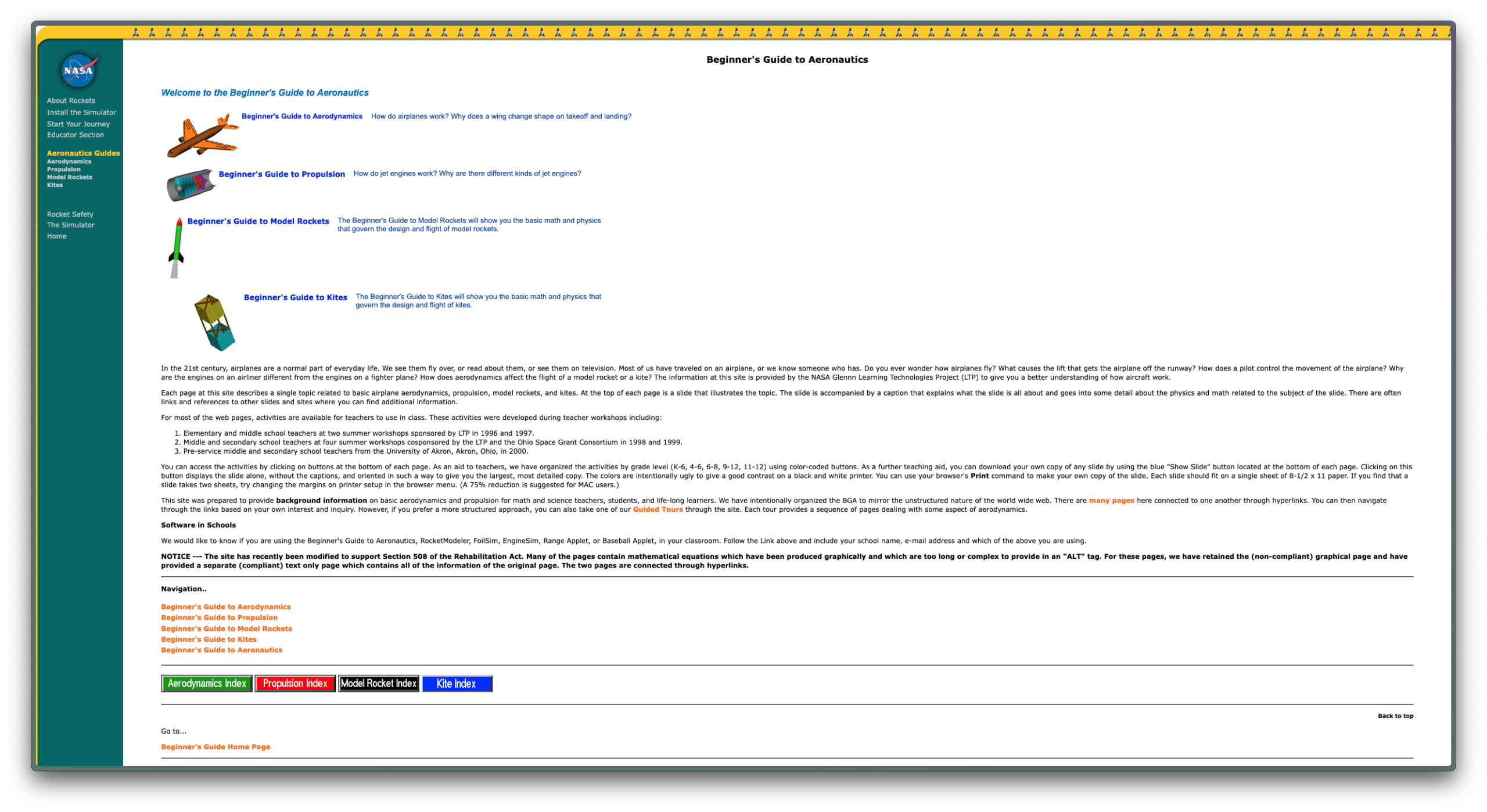
Okay so get to the point! What did you do about it?! What I’m trying to get at is that before I started this project, my goal was to build a game that would encourage players to explore with configuration aerodynamics, build an intuitive understanding of the relationship between aircraft geometry and performance, and fall in love with aircraft design just like I did all those years ago through engaging, interactive gameplay and mission design. This was an incredibly ambitious project, as not only did I have to teach myself how to code in Unity (again), but I had to build the physics simulation that would be running in the background from scratch, as the out-of-the-box physics engine in Unity isn’t that great and I already was finding issues with Kerbal Space Program‘s simplified physics. All of this was done completely on my own! Although I expected to struggle due to working on this, I certainly did not foresee how slow development would be on a solo project of this scope. I’ll get into all of that later! Since this is my second quarter in CS399, I’ll spare some of the introductory details (and details of the simulator) as I went into detail on that last quarter. If you’re interested, I’ve included the PDF of my report last quarter at the end of this blog post (my bad). I’ll split this reflection up into the same main sections of the game — the Editor, the Simulator, and the Tutorial.
The Editor
Not much changed in the Editor this quarter. I spent most of last quarter learning how Unity UI Documents worked, how to make things clickable and drag-able (is that a word?) and how to procedurally generate a hangar for airplane designs to sit in. Admittedly, the UI still looks pretty basic — the gray boxes with white text aren’t exactly jumping off the screen. However, after some reflection and discussion with playtesters, I’ve learned this isn’t necessarily a bad thing. The magic circle for this game is very different from other games I’ve worked on (see Conclave), and my UI design should treat it as such. In a sense, the gray, sterile environment of the editor does in fact give players the feeling that they are working at an engineering job with some sort of design software á la Autodesk Fusion, or even Blender. Despite this, there were some very important changes I needed to make to the editor. First and foremost was text size — it was simply too small! No one really complained about it, but each and every time I saw someone playtesting the game, I saw their necks craning towards the screen to read everything I had written (I wish I had compiled photos of this phenomenon it was actually kinda funny). Figure 2 includes screenshots of the before and after. Note the legibility change from left to right. Night and day, according to playtesting!
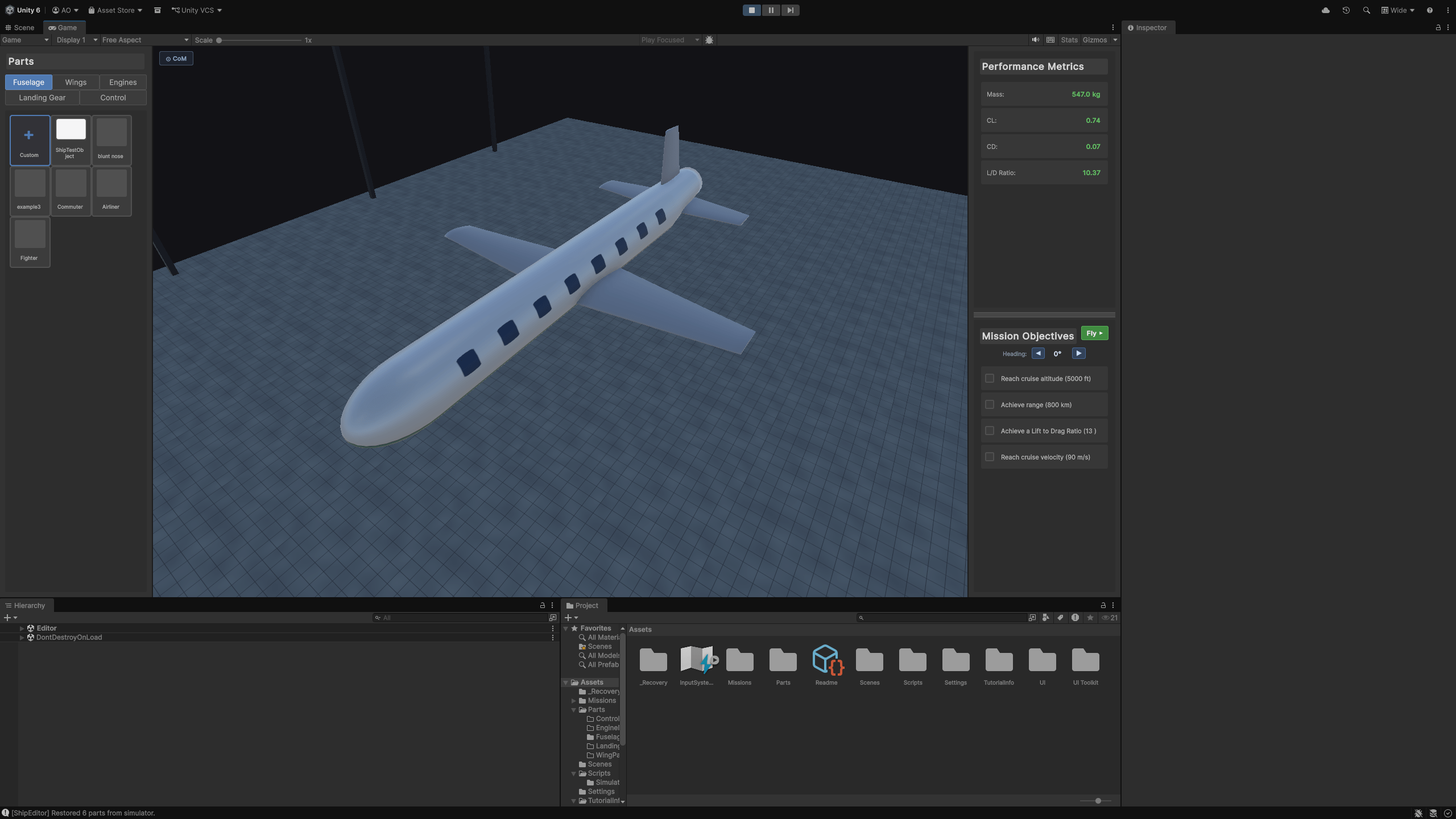
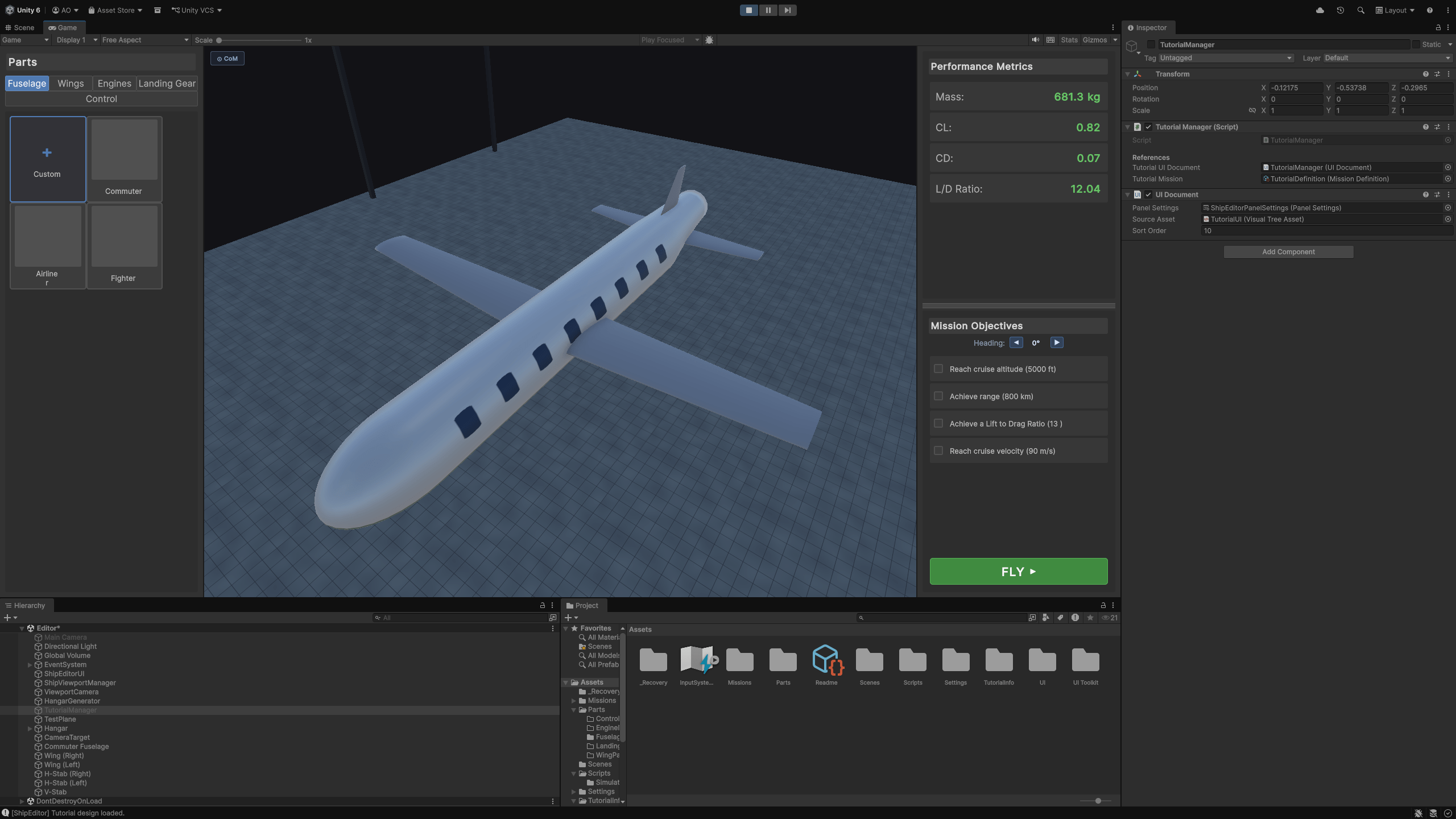
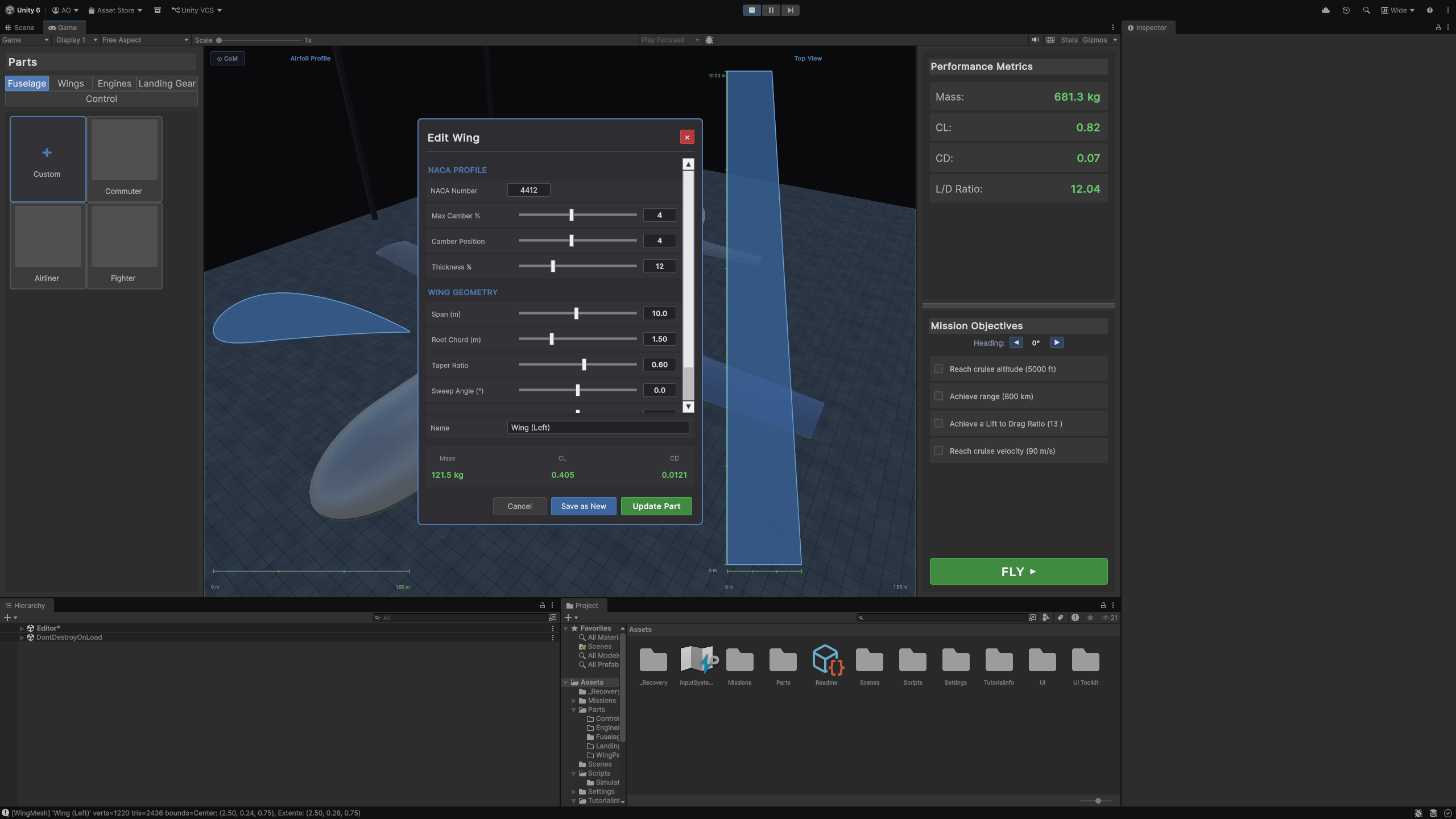
There certainly still is a lot of tweaking that needs to be made to the general UI. Ideally, I would give it a little more charm beyond the simple, straightforward gray background and green text, but it works for now. Another addition I wanted to highlight is the wing editor. This was a fantastic suggestion (shoutout Leo Sui in CS399, brother of my ex-TA for the Aero Capstone Angelo Sui) that I got nothing but good feedback on. The point of the game is to show players how geometry changes in real time, right? What better way to do this than by showing how the airfoils and wings change in real time with their performance metrics as you change their geometry? In an effort to accomplish this, I added a side view and top view to either side of the wing editor that change live as the player moves the sliders to edit the wing geometry. It’s a little hard to show statically through images here, but I’ll show a quick before and after to give a sense of what has been accomplished in Figure 3.
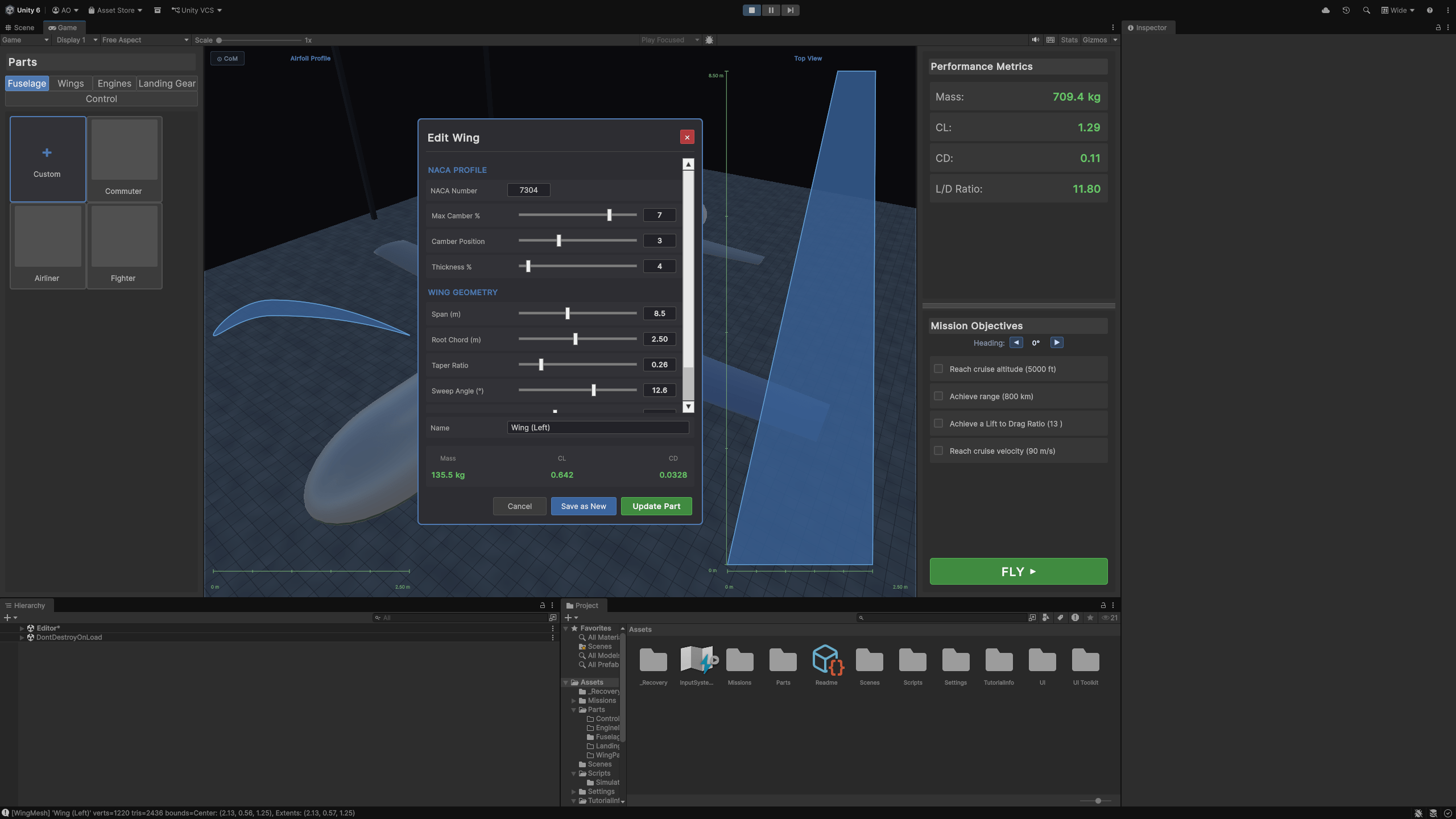
Some other minor bugs and anti-Butching were added, such as making sure wings and fuselages only were placed in the editor from dragging/dropping if they were actually dropped into the editor. There was a weird bug where if a player accidentally clicked a part, it would just appear behind the part panel and completely confuse the performance metrics.
The Simulator
The Simulator experienced the bulk of the changes this quarter. At the end of last quarter, I had built out a simulator that would simulate takeoff, cruise, and landing for a given aircraft design. Now this was all well and good, besides the fact that it was so incredibly, painfully boring to watch. Although I got feedback telling me it looked neat and it was cool that the physics was working (despite some bugs), the feedback was also overwhelmingly: “this doesn’t feel like a game.” Not a good look for a game. A screenshot of the old simulator is in Figure 4.

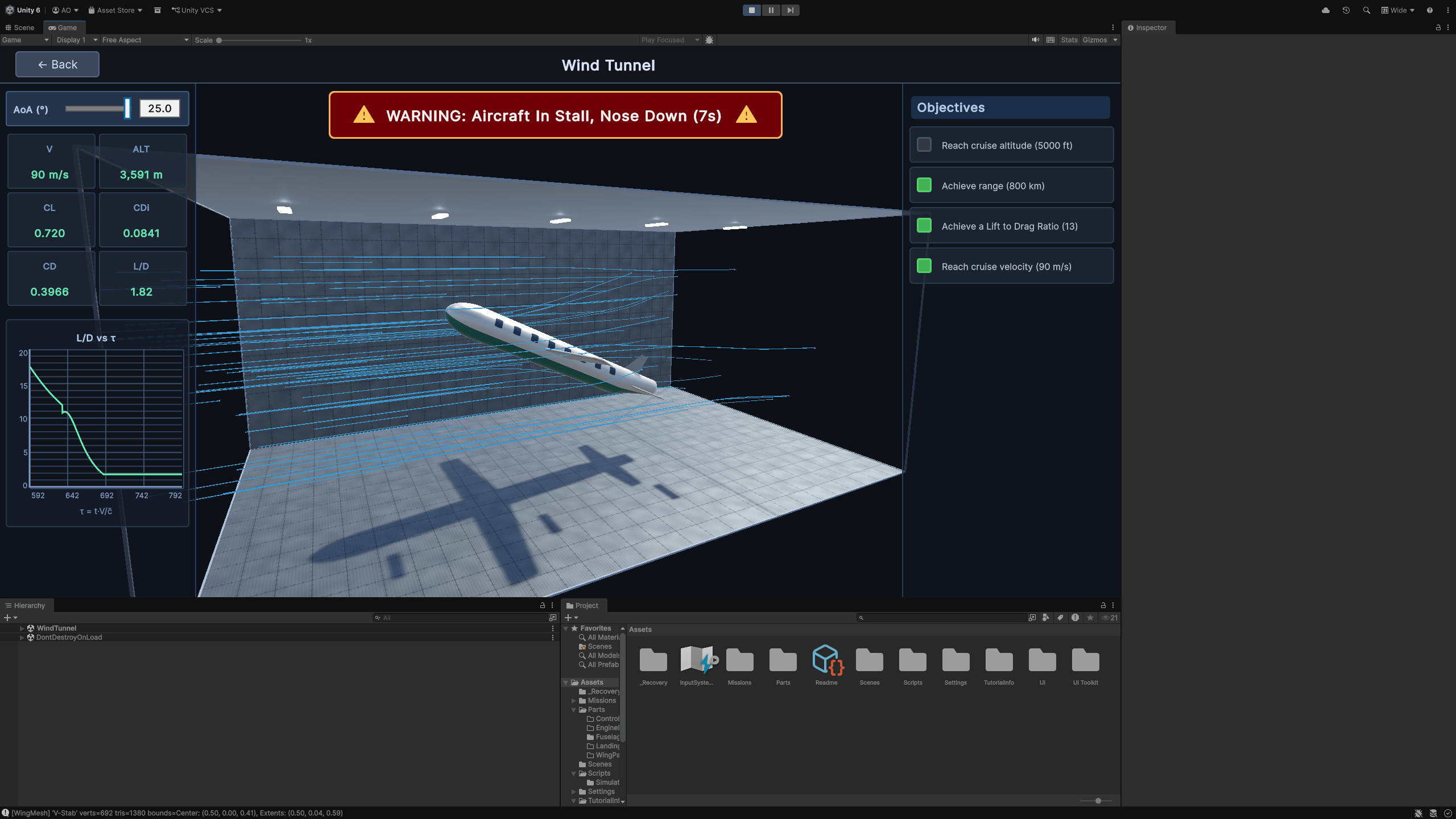
So I went back to the drawing board. I collected different thoughts and ideas, discussed with different playtesters, and came up with a solution — ditch the simulator. No, of course I wasn’t going to get rid of one of the main aspects of my game, one of the few things that would make it actually fun. Instead, I ditched the open-environment simulator with something a little more personal. A little closer to reality, perhaps. I replaced it for… A WIND TUNNEL! Suddenly, many of the issues I was experiencing with the Simulator — visual monotony, long wait times, no interaction — almost solved themselves! With a wind tunnel Simulator, we could reintroduce the unrealism the game was missing to make it feel like a fully fleshed-out game. The moment I made the switch, I started getting positive feedback. First, the wind tunnel itself is seen in Figure 5. Instead of having a wide, open, empty, desolate landscape like the previous simulator in Figure 4, the wind tunnel is small, reserved, pulled in, and doesn’t allow the player’s eyes to wander into the void around the wind tunnel. Instead, the tunnel takes up the vast majority of the space on screen, and any empty space on either side of the airplane is taken up by different performance metrics that update during the simulation.

However, this new wind tunnel by itself wasn’t enough to make the game feel like a game. In playtesting, I noticed there was in fact something lost from the open-air simulator — a sense of distance, space, and speed. In the wind tunnel, the airplane felt completely static, and despite the performance metrics changing, boring. As such, I brainstormed a few different approaches and landed on adding streamlines to the simulation, giving the players a sense of how flow is moving around the airplane. These streamlines are incredibly basic as I don’t think Unity’s physics engine is capable of running a full computational fluid dynamics (CFD) code in real-time (it was already struggling with the basic flight physics already present in the sim), but this unrealism was never felt nor commented on by any playtesters. It should be noted that, unfortunately, I was not able to acquire playtesters within my target demographic, but nevertheless this feedback was incredibly helpful. Figure 6 shows the streamlines added to the wind tunnel.

As you can probably tell, I was incredibly proud of how these streamlines turned out. Players felt more engaged and more interested in what was going on in the simulation overall. However, I wasn’t done making changes yet. After tweaking the streamlines more and more, I realized there were still more opportunities for players to engage actively with the wind tunnel. That’s when I added the angle of attack (AoA) slider seen in the top left-hand corner of Figures 5 and 6. This slider would set a target AoA for the airplane and the design would slowly increase in AoA to meet whatever was input. In addition to the slider, there is a text box on the left that allows for more precise testing. I was really excited to add this AoA slider as it allows for some really interesting and fun shenanigans, both in realism and in unrealism.
On the realism front, changes in AoA also impact the performance of an airplane. In order to represent this live, I added a Lift-to-Drag Ratio (L/D) to nondimensionalized time (τ) plot in the bottom left-hand corner that would change with the performance of the aircraft. This is exactly the vision I had for the game starting out — showing players how changes in the aircraft’s geometry and position in the world affect its performance characteristics. In this way, a player can fine-tune their L/D with certain AoA. Does your design require an AoA of above 5 degrees to achieve a reasonable L/D? Maybe we should go back to the drawing board, that doesn’t sound right!
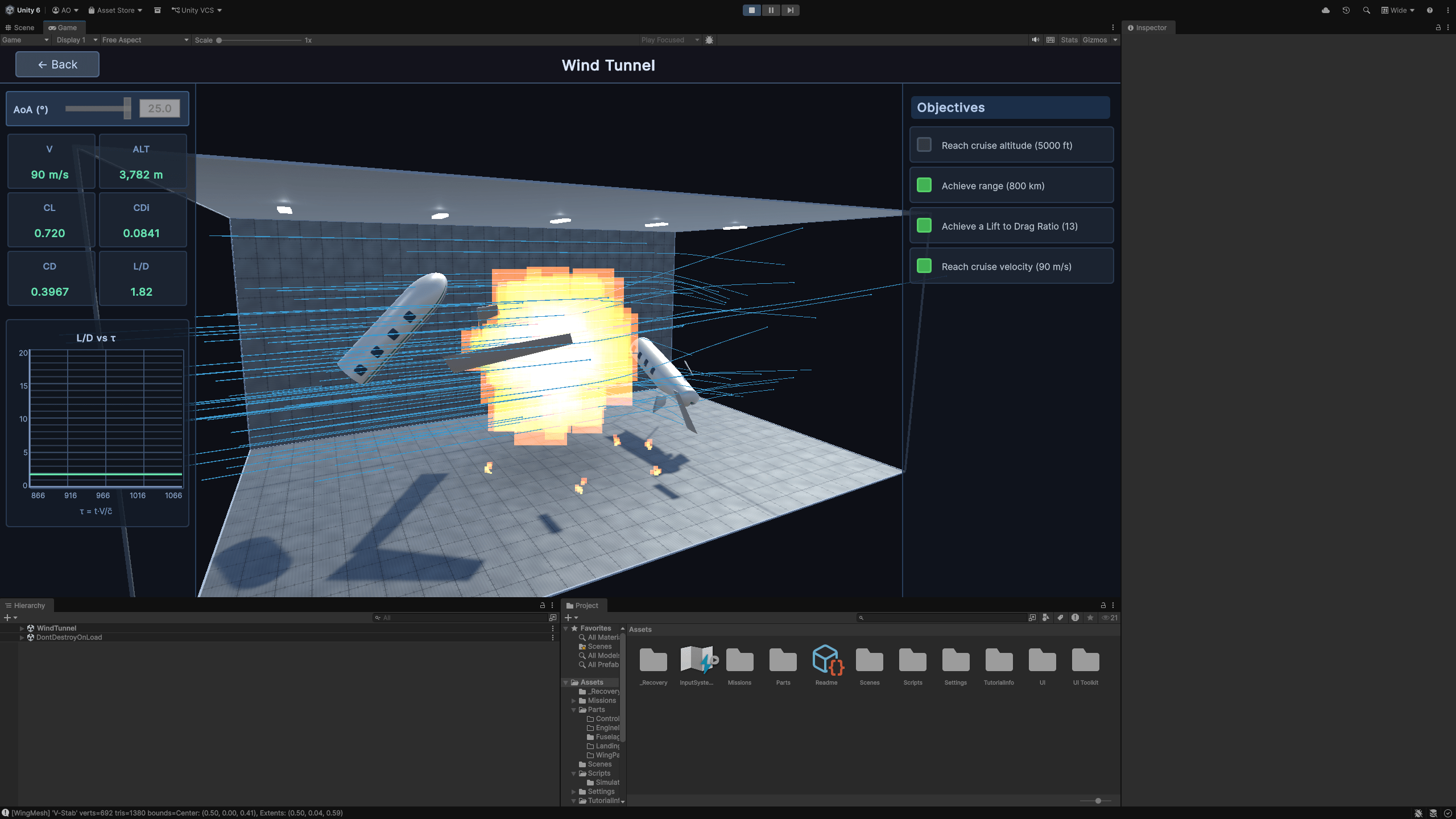
The unrealism front was the one I was most excited for, though. More than a few playtesters mentioned to me that they would be interested in seeing a failure state for the aircraft — more specifically, they were interested in seeing an… explosive failure state for the aircraft. Who am I to ignore the voices of the people if their voices are correct and align with my vision for the game? As such, I added two things. First, I added an AoA warning that would alert the player if their AoA was too low, making it impossible for the plane to pull up back into cruise, or if their AoA was too high, creating a stall condition on the aircraft’s wings. Second, I added the failure state. After 10 seconds in a warning zone, the plane explodes in a hot ball of fire and the parts fly all over the place, leaving a dark spot in the center of the test section and patches of fire along the testbed. Needless to say, this change was hilarious and begot the exact forgiveness via unrealism I was in search of for the past two quarters. Figure 7 shows both of these additions in all their glory. Bask in it!
The Tutorial
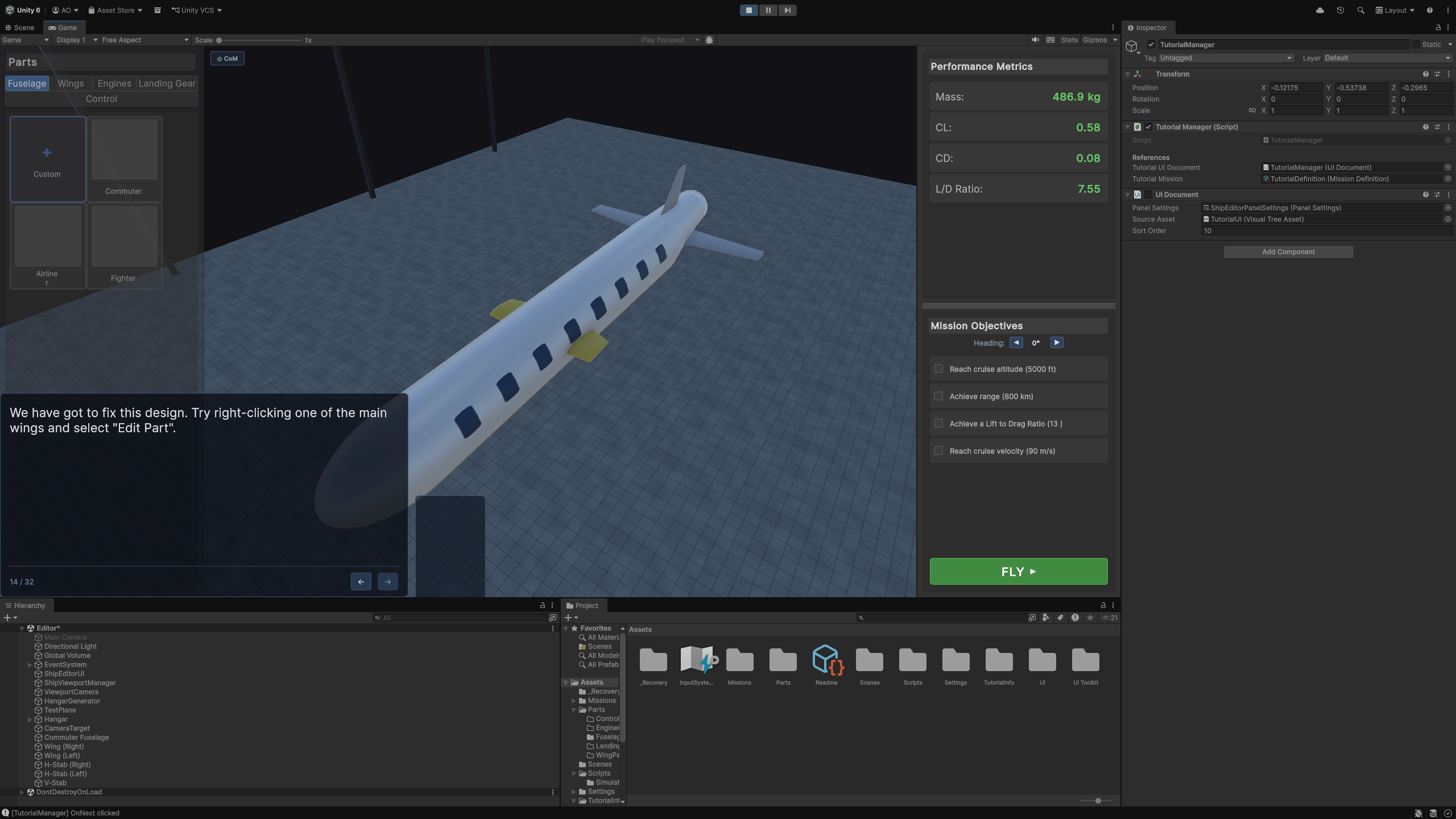
As much as I am proud of the progress made in the simulator, I do wish I had more time this quarter to work on the tutorial mission. It’s pretty much complete, with text from the smarmy robot named T.B.D. coaching you through the first mission. Changes to the tutorial were small but nevertheless quite important. First, through playtesting I was told the black screen with the text from T.B.D. alone wasn’t enough to really draw players in, so instead the background is greyed out at the outset. Giving a little more visual food is good, I’ve gathered. Next, after some confusion on how to interact with the game, I added some highlighting to bring the players eyes towards what I wanted them to accomplish in the mission in addition to what was being said by the tutorial. It was certainly a rude awakening when players weren’t interacting with the game like I was, but in retrospect how could they have known? Figure 8 shows both of these visual changes.
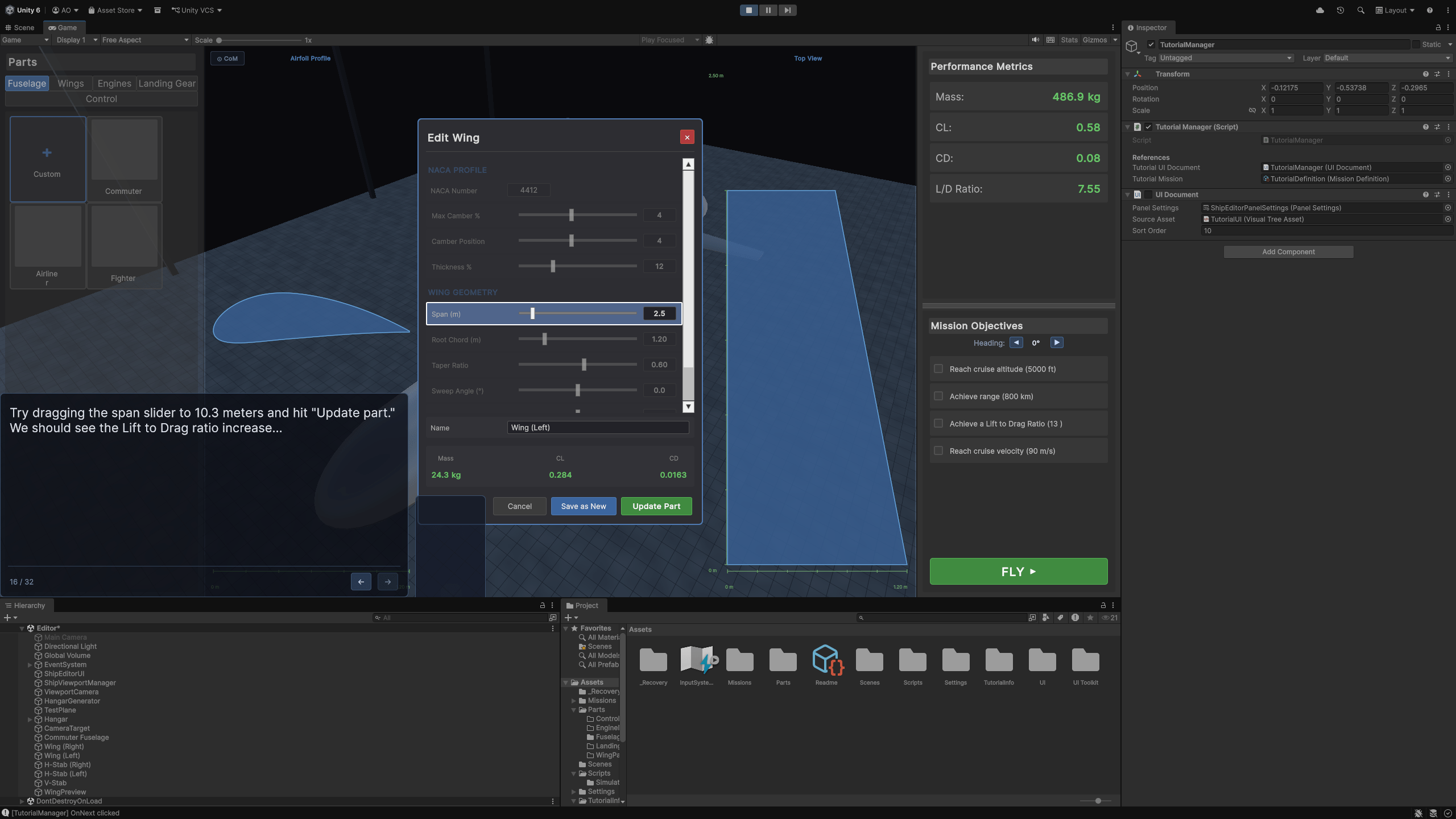
Finally, failure and success states of the tutorial. These are almost complete, and T.B.D. will give feedback whenever you win or explode in a hot ball of fire. Unfortunately, the summary screen I wanted to add that grades designs was not added due to time constraints. In reality, a ton of things weren’t added due to time constraints, but that’s just how it shakes out sometimes… Regardless, I’m incredibly proud of how this tutorial came together. Players generally agreed that they understood how to play the game after going through the tutorial, and were excited to see what other kinds of missions could be added to the game. Some playtesters were even suggesting different missions and mission requirements, which I think is the highest form of praise. If a player is thinking about how to make your game theirs, that’s how you know you’ve made an impact!
Conclusion
Ah, what a project this has been. I wish I had the entire year only to work on this game and the others in my backlog (LOOK FOR CONCLAVE!!!!). Such is life! I feel like throughout these projects, the thing I struggle the most with is scope. I remember submitting my proposal at the beginning of last quarter thinking I would have the simulator ready by Week 5. Of Winter. I’m still adding stuff to the simulator and it’s damn near mid-June! I’ve never worked on a game for this long before, so I’ve learned a lot of unique lessons from it.
First is regarding scope. I have accepted that scope will always be an issue for me. I will always want to do so much more than I’m capable of. That’s not necessarily a bad thing! As long as I know where I want my scope to be, I now have learned how to dial it back by ~0.75x to get my scope where it needs to be. Even by the end of CS377G I was struggling with scope creep, but I think that towards the end of this project I finally learned how to reel myself back in. This is not to say that I stopped myself from exploring other opportunities with this game — on the contrary, I think that reeling back my scope and focusing only on the tutorial and the wind tunnel actually made them much more fun than they would’ve been if I had forced myself to think and worry and mull over the 2500 other details elsewhere in the game.
The second lesson I really, truly learned this quarter is in regards to unrealism. In our very first meeting about this game, I asked Christina — “how can I make this game actually feel like a game and not a problem set?” I was given my guiding light, my North Star from this: “a little unrealism begets forgiveness.” Forgiveness? Unrealism? How could I do that in a way that isn’t completely ripping off KSP but is also true to my vision for the game? Little by little, experimenting in the wind tunnel and in the tutorial, I found my unrealism. I found the little nuggets that would make people laugh — the smarmy robot, the weird design the player needs to fix, the explosion in the wind tunnel, T.B.D.’s reaction to the explosion. These little moments were the emotional core of the game that kept players engaged and interested, even if they had no idea what they were doing since they were outside the target demographic. If you’ve played Conclave, you know that I have a… particular writing style. Bringing that into the sterility of Remove Before Takeoff‘s design editor creates this incredible contrast that people really connected with.
I loved and appreciated each second I was able to work on this game. It’s still far from being finished, but I’m proud of what was accomplished and I look forward to continuing its development in the future. I was able to meet a lot of cool people in the School of Education (shoutout Luna Laliberte) who will definitely give me some good pointers once the game’s systems are ready for real teaching, and I’ll still be able to come back to the Department of Aeronautics and Astronautics to playtest if I want to. Thank you to everyone in the Game Design Group that gave me incredible feedback and helped with brainstorming — I couldn’t do it without this amazing group of amazing humans. Special thanks to Butch for always finding a way to break my game, Leyth for the Unity physics recommendations, Ngoc for pushing me to demo Conclave when I definitely should’ve been studying for my exams, and Krystal for distracting everyone from my weird playtests with her incredible hotpot game.
I hope I can post on this blog again someday. Never stop making games!


